<?xml version="1.0" encoding="utf-8"?>
<feed xmlns="http://www.w3.org/2005/Atom">
        <title>Bedis9 website.</title>
        <subtitle>From an Open Source contributor.</subtitle>
        <link href="https://www.bedis9.netcontent/feed.xml" rel="self" />
        <link href="https://www.bedis9.net" />
        <id>https://www.bedis9.net</id>
        <updated>2024-17-02T00:00:00Z</updated>
        <author>
                <name>Baptiste Assmann</name>
                <email>bedis9@gmail.com</email>
        </author>
        <entry>
                <title>Add HAProxy in front of Home Assistant</title>
                <link href="https://www.bedis9.net/posts/2024_02_17_haproxy_in_front_of_homeassistant.html" />
                <link rel="alternate" type="text/html" href="https://www.bedis9.net/posts/2024_02_17_haproxy_in_front_of_homeassistant.html" />
                <id>https://www.bedis9.net/posts/2024_02_17_haproxy_in_front_of_homeassistant.html</id>
                <updated>2024-17-02T00:00:00Z</updated>
		<published>2024-17-02T00:00:00Z</published>
		<summary>   How to configure HAProxy and homeassistant together HAProxy is a widely
   used HTTP reverse proxy and I use it at home to give access to various
   internal services I need. At home, I also use `home assistant
   /www.home-assistant.io/>`_ to manage my heaters and my aquarium. Both
   solutions are open source and I guess many people will use them
   together at some point.</summary>
		<author><name>Baptiste Assmann</name><email>bedis9@gmail.com</email></author>
                <content type="html"><![CDATA[<p><cite>Posted on 2024-17-02</cite></p>
<p>HAProxy is a widely used HTTP reverse proxy and I use it at home to give access to various internal services I need. At home, I also use <a class="reference external" href="https://www.home-assistant.io/">home assistant</a> to manage my heaters and my aquarium. Both solutions are open source and I guess many people will use them together at some point.</p>
<p>Because HAProxy operates as a reverse proxy, it uses (by default) an IP address from the local machine to get connected to the server (home assistant in our case). When doing so, home assistant will see all clients coming from the same IP address. The problem is that Home assistant can be configured to block IPs which are <a class="reference external" href="https://www.home-assistant.io/integrations/http/#ip_ban_enabled">failed too many login attempts</a>.</p>
<div class="admonition warning">
<p class="first admonition-title">Warning</p>
<p class="last">This means that if HAProxy IP address  got banned, then nobody will be able to use Home assistant anymore!</p>
</div>
<p>In order to avoid this situation, we want to properly configure HAProxy and home assistant together.</p>
<p>First, let's update HAProxy's configuration to send a <strong>X-Forwarded-For</strong> HTTP header which contains the end user client IP address:</p>
<pre class="code literal-block">
backend b_homeassistant
  [...]
  http-request set-header x-forwarded-for %[src]
  [...]
</pre>
<p>Now, on home assistant side, just configure it to tell it there is an HAProxy in front of it and it must trust the <strong>X-Forwarded-For</strong> header sent by it:</p>
<pre class="code literal-block">
http:
  use_x_forwarded_for: true
  trusted_proxies:
    - 192.168.A.B    # Reverse proxy / HAProxy IP address
</pre>
<p>When somebody fails on login, you'll see a notification like this:</p>
<img alt="/posts/images/homeassistant_failed_login_notification.png" src="/posts/images/homeassistant_failed_login_notification.png" />
<p>This shouldn't be the HAProxy address, but the address of the mobile phone / laptop who performed this attempt!</p>
		
		<a href="https://www.bedis9.net/posts/2024_02_17_haproxy_in_front_of_homeassistant.html#disqus_thread">Comments</a>
		]]></content>
        </entry>
        <entry>
                <title>Get HAProxy core files on Debian 12</title>
                <link href="https://www.bedis9.net/posts/2024_02_17_get_haproxy_corefiles_on_debian.html" />
                <link rel="alternate" type="text/html" href="https://www.bedis9.net/posts/2024_02_17_get_haproxy_corefiles_on_debian.html" />
                <id>https://www.bedis9.net/posts/2024_02_17_get_haproxy_corefiles_on_debian.html</id>
                <updated>2024-17-02T00:00:00Z</updated>
		<published>2024-17-02T00:00:00Z</published>
		<summary>   Procedure to get your core files on debian12 HAProxy is usually very
   reliable, that said my use case is not very common: I am using cutting
   edge version of the software on an `aarch64
   /www.bedis9.net/posts/2024_02_14_haproxy_cross_compile.html>`_ system
   and I may use code path that very few people uses, and so I may meet
   some bugs.</summary>
		<author><name>Baptiste Assmann</name><email>bedis9@gmail.com</email></author>
                <content type="html"><![CDATA[<p><cite>Posted on 2024-17-02</cite></p>
<p>HAProxy is usually very reliable, that said my use case is not very common: I am using cutting edge version of the software on an <a class="reference external" href="https://www.bedis9.net/posts/2024_02_14_haproxy_cross_compile.html">aarch64</a> system and I may use code path that very few people uses, and so I may meet some bugs.</p>
<div class="admonition note">
<p class="first admonition-title">Note</p>
<p class="last">HAProxy is Open Source and what I love the most about open source is that you can help the community making the product even better. Contributions are not only code, they may be a nice bug report that dev can leverage to quickly find the issue and make the software more reliable. This applies to any open source solution you use!</p>
</div>
<p>So today, we'll see how we can help the community when an unexpected event happens :)</p>
<div class="admonition note">
<p class="first admonition-title">Note</p>
<p class="last">Keep in mind these instructions apply to Debian 12. They might be different for your own environment.</p>
</div>
<p>First, we need to raise the size for the core files. For this purpose, we create a new file in <tt class="docutils literal">/etc/security/limits.d/core.conf</tt>:</p>
<pre class="code literal-block">
*               soft    core            unlimited
</pre>
<p>Then, we need to tell our kernel where to save coredump files. For this, we'll add a new file in <tt class="docutils literal"><span class="pre">/etc/sysctl.d/98-core.conf</span></tt> with the following content:</p>
<pre class="code literal-block">
kernel.core_pattern=/tmp/core-%e-%p
</pre>
<p>Because our HAProxy is chrooted, we need to ensure that a <cite>/tmp</cite> folder exists in there:</p>
<pre class="code bash literal-block">
sudo<span class="whitespace"> </span>mkdir<span class="whitespace"> </span>YOUR_HAPROXY_CHROOT_PATH/tmp<span class="whitespace">
</span>sudo<span class="whitespace"> </span>chmod<span class="whitespace"> </span>a+w<span class="whitespace"> </span>YOUR_HAPROXY_CHROOT_PATH/tmp
</pre>
<p>Last, we can also enable the <a class="reference external" href="https://www.haproxy.com/documentation/haproxy-configuration-manual/latest/#set-dumpable">set-dumpable</a> parameter in HAProxy's global configuration.</p>
<pre class="code literal-block">
global
 [...]
 set-dumpable
</pre>
<p>According to the doc, this parameter will perform the following:</p>
<blockquote>
will try hard to re-enable core dumps that were possibly disabled by
file size limitations (ulimit -f), core size limitations (ulimit -c),
or &quot;dumpability&quot; of a process after changing its UID/GID (such</blockquote>
<p>It's basically a very nice helper, but does not prevent you from checking a core dump is well produced at the expected place: <tt class="docutils literal">sudo kill <span class="pre">-11</span> $(pgrep haproxy)</tt> will produce a core.</p>
<p>A quick troubleshooting / checklist if you can't get your core files:
- ensure ulimit -f and ulimit -c are set properly for the user HAProxy drops privileges to
- ensure the target core dump directory exists in the chroot
- ensure the user running the HAProxy process can write into this directory
- always try to generate a core to double check everything works as expected</p>
<p>For more information and use cases on this topic, you can read <a class="reference external" href="https://www.haproxy.com/documentation/haproxy-enterprise/administration/troubleshooting/enable-core-dumps/">this excellent page</a></p>
<p>For the record, the &quot;bug&quot; I am tracking currently is not in HAProxy, but somewhere between OpenSSL and the libc on my aarch64 debian. Here is my backtrace from gdb:</p>
<pre class="code literal-block">
#0  0x0000ffffa12ef690 in free () from /lib/aarch64-linux-gnu/libc.so.6
#1  0x0000aaaad8509cec in ossl_ecx_key_free ()
#2  0x0000aaaad8468f18 in ecx_freectx ()
#3  0x0000aaaad83b22c4 in evp_pkey_ctx_free_old_ops ()
#4  0x0000aaaad83b2330 in EVP_PKEY_CTX_free ()
#5  0x0000aaaad82a60dc in ssl_derive ()
#6  0x0000aaaad82edfe0 in tls_construct_stoc_key_share ()
#7  0x0000aaaad82e410c in tls_construct_extensions ()
#8  0x0000aaaad82feea4 in tls_construct_server_hello ()
#9  0x0000aaaad82ef888 in state_machine ()
#10 0x0000aaaad82b616c in SSL_do_handshake ()
#11 0x0000aaaad7f01670 in ssl_sock_handshake (conn=0xaaaadb76cb70, flag=134217728) at src/ssl_sock.c:6283
#12 0x0000aaaad7f02398 in ssl_sock_io_cb (t=0xffff8c02b7d0, context=0xffff8c02ba10, state=32960)
    at src/ssl_sock.c:6626
#13 0x0000aaaad81ce300 in run_tasks_from_lists (budgets=0xffff9b7ec6d8) at src/task.c:596
#14 0x0000aaaad81cf090 in process_runnable_tasks () at src/task.c:876
#15 0x0000aaaad816e73c in run_poll_loop () at src/haproxy.c:3050
#16 0x0000aaaad816f0b4 in run_thread_poll_loop (data=0xaaaad8af3cc0 &lt;ha_thread_info+192&gt;) at src/haproxy.c:3252
</pre>
		
		<a href="https://www.bedis9.net/posts/2024_02_17_get_haproxy_corefiles_on_debian.html#disqus_thread">Comments</a>
		]]></content>
        </entry>
        <entry>
                <title>Cross compile HAProxy 2.9 for aarch64 from x8664 with QUIC</title>
                <link href="https://www.bedis9.net/posts/2024_02_14_haproxy_cross_compile.html" />
                <link rel="alternate" type="text/html" href="https://www.bedis9.net/posts/2024_02_14_haproxy_cross_compile.html" />
                <id>https://www.bedis9.net/posts/2024_02_14_haproxy_cross_compile.html</id>
                <updated>2024-14-02T00:00:00Z</updated>
		<published>2024-14-02T00:00:00Z</published>
		<summary>   Use the power of your laptop to compile an HAProxy binary for smaller
   ARM devices HAProxy is a reverse-proxy software Load-Balancer. It is
   very famous for its high performance and reliability. That's why we may
   want to run it anywhere we can.</summary>
		<author><name>Baptiste Assmann</name><email>bedis9@gmail.com</email></author>
                <content type="html"><![CDATA[<p><cite>Posted on 2024-14-02</cite></p>
<p>HAProxy is a reverse-proxy software Load-Balancer. It is very famous for its high performance and reliability. That's why we may want to run it anywhere we can.</p>
<p>I am the happy owner of a <a class="reference external" href="https://wiki.radxa.com/RockpiS">rock pi s</a> device which embeds an aarch64 4 cores CPU. I could use HAProxy provided by armbian (version 2.6.12), but for my needs it's a bit old. I want to use latest revese connect feature from HAProxy in order to expose some internal services through an HAProxy running somewhere on Internet. And for this purpose I need HAProxy 2.9+. So I have to compile it.</p>
<p>I don't want to use this small CPU and poor microSD card to compile HAProxy, so I prefer using my old good laptop (a lenovo x230).</p>
<p>Because my laptop runs a x86_64 CPU, I have to cross compile to aarch64 and here is how I do it.</p>
<div class="admonition note">
<p class="first admonition-title">Note</p>
<p class="last">in my case, I wrote a Makefile to automate all these commands.</p>
</div>
<p>First, we need to install required packages:</p>
<pre class="code bash literal-block">
sudo<span class="whitespace"> </span>apt-get<span class="whitespace"> </span>install<span class="whitespace"> </span>--yes<span class="whitespace"> </span>gcc-aarch64-linux-gnu<span class="whitespace"> </span>binutils-aarch64-linux-gnu
</pre>
<p>I usually have a <strong>$HOME/haproxy</strong> folder where I git clone various versions of HAProxy source code and dependency.</p>
<p>Now we have to prepare an OpenSSL library:
- we'll use static compilation with HAProxy, so no need the share library
- we'll install source files and openssl related objects into a dedicated directory: <tt class="docutils literal">/opt/arm/openssl</tt></p>
<pre class="code bash literal-block">
<span class="name builtin">cd</span><span class="whitespace"> </span>haproxy<span class="whitespace">
</span>git<span class="whitespace"> </span>clone<span class="whitespace"> </span>https://github.com/openssl/openssl.git<span class="whitespace">
</span>git<span class="whitespace"> </span>checkout<span class="whitespace"> </span>-b<span class="whitespace"> </span>OpenSSL_1_1_1w<span class="whitespace"> </span>OpenSSL_1_1_1w<span class="whitespace">
</span>make<span class="whitespace"> </span>clean<span class="whitespace">
</span>./Configure<span class="whitespace"> </span>linux-aarch64<span class="whitespace"> </span><span class="name variable">CC</span><span class="operator">=</span>/usr/bin/aarch64-linux-gnu-gcc<span class="whitespace"> </span><span class="literal string escape">\
</span><span class="whitespace">    </span>--prefix<span class="operator">=</span>/opt/arm/openssl<span class="whitespace"> </span>--openssldir<span class="operator">=</span>/opt/arm/openssl<span class="whitespace"> </span>-static<span class="whitespace"> </span>no-shared<span class="whitespace">
</span>make<span class="whitespace"> </span>-j<span class="whitespace"> </span><span class="literal number">4</span><span class="whitespace">
</span>sudo<span class="whitespace"> </span>make<span class="whitespace"> </span>install
</pre>
<p>Now, we're ready to compile HAProxy 2.9:</p>
<pre class="code bash literal-block">
<span class="name builtin">cd</span><span class="whitespace"> </span>haproxy<span class="whitespace">
</span>git<span class="whitespace"> </span>clone<span class="whitespace"> </span>http://git.haproxy.org/git/haproxy-2.9.git/<span class="whitespace"> </span><span class="literal number">2</span>.9<span class="whitespace">
</span>make<span class="whitespace"> </span>clean<span class="whitespace">
</span>make<span class="whitespace"> </span>-f<span class="whitespace"> </span>Makefile<span class="whitespace"> </span><span class="name variable">TARGET</span><span class="operator">=</span>linux-glibc<span class="whitespace"> </span><span class="name variable">CC</span><span class="operator">=</span>/usr/bin/aarch64-linux-gnu-gcc<span class="whitespace"> </span><span class="literal string escape">\
</span><span class="whitespace">    </span><span class="name variable">USE_OPENSSL</span><span class="operator">=</span>y<span class="whitespace"> </span><span class="name variable">SSL_INC</span><span class="operator">=</span>/opt/arm/openssl/include<span class="whitespace"> </span><span class="name variable">SSL_LIB</span><span class="operator">=</span>/opt/arm/openssl/lib<span class="whitespace"> </span><span class="literal string escape">\
</span><span class="whitespace">    </span><span class="name variable">USE_LIBCRYPT</span><span class="operator">=</span><span class="whitespace"> </span><span class="name variable">USE_PROMEX</span><span class="operator">=</span><span class="literal number">1</span><span class="whitespace"> </span><span class="name variable">USE_QUIC</span><span class="operator">=</span><span class="literal number">1</span><span class="whitespace"> </span><span class="name variable">USE_QUIC_OPENSSL_COMPAT</span><span class="operator">=</span><span class="literal number">1</span><span class="whitespace"> </span><span class="literal string escape">\
</span><span class="whitespace">    </span><span class="name variable">CPU</span><span class="operator">=</span>armv8<span class="whitespace"> </span><span class="literal string escape">\
</span><span class="whitespace">    </span>-j<span class="whitespace"> </span><span class="literal number">4</span>
</pre>
<div class="admonition note">
<p class="first admonition-title">Note</p>
<p class="last">one of the limitation here is that the binary produced will not be compatible with systemd, so just use an init file.</p>
</div>
		
		<a href="https://www.bedis9.net/posts/2024_02_14_haproxy_cross_compile.html#disqus_thread">Comments</a>
		]]></content>
        </entry>
        <entry>
                <title>Extend HAProxy stats page with more stats for SSL, H2 and HTTP/1.1</title>
                <link href="https://www.bedis9.net/posts/2022_12_03_haproxy_extended_stats.html" />
                <link rel="alternate" type="text/html" href="https://www.bedis9.net/posts/2022_12_03_haproxy_extended_stats.html" />
                <id>https://www.bedis9.net/posts/2022_12_03_haproxy_extended_stats.html</id>
                <updated>2022-12-03T00:00:00Z</updated>
		<published>2022-12-03T00:00:00Z</published>
		<summary>   Augment HAProxy stats page with even more statistics regarding SSL, H2
   and HTTP/1.1 HAProxy is a reverse-proxy software Load-Balancer. It is
   very famous for its high performance and reliability. That said, it
   also proposes as well very strong observability features: a stats page
   with many counters, a very versatile log line that can be tailored and
   augmented to your needs, etc... Today, we'll focus on the stats page.</summary>
		<author><name>Baptiste Assmann</name><email>bedis9@gmail.com</email></author>
                <content type="html"><![CDATA[<p><cite>Posted on 2022-12-03</cite></p>
<p>HAProxy is a reverse-proxy software Load-Balancer. It is very famous for its high performance and reliability. That said, it also proposes as well very strong observability features: a stats page with many counters, a very versatile log line that can be tailored and augmented to your needs, etc... Today, we'll focus on the stats page.</p>
<p>To enable stats page in HAProxy, add the following configuration block to a <tt class="docutils literal">frontend</tt> or a <tt class="docutils literal">backend</tt> section, adjusting parameters accordingly. I personally add it into a <tt class="docutils literal">backend</tt> and use a <tt class="docutils literal"><span class="pre">use-backend</span></tt> rule to route the traffic to it.</p>
<pre class="code ini literal-block">
<span class="name attribute">stats enable</span><span class="whitespace">
</span><span class="name attribute">stats uri /</span><span class="whitespace">
</span><span class="name attribute">stats auth USERNAME</span><span class="operator">:</span><span class="literal string">********</span><span class="whitespace">
</span><span class="name attribute">stats show-legends</span><span class="whitespace">
</span><span class="name attribute">stats show-modules</span>
</pre>
<p>The first 3 lines are pretty common. We'll focus on the last 2 ones:</p>
<ul class="simple">
<li><tt class="docutils literal">stats <span class="pre">show-legends</span></tt> (<a class="reference external" href="https://www.haproxy.com/documentation/hapee/latest/onepage/#4-stats%20show-legends">documentation</a>): enables extra information (provided as tooltips) about <tt class="docutils literal">backend</tt> / <tt class="docutils literal">frontend</tt> / <tt class="docutils literal">server</tt> such as capabilities, mode, IPs.</li>
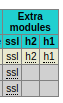
<li><tt class="docutils literal">stats <span class="pre">show-modules</span></tt> (<a class="reference external" href="https://www.haproxy.com/documentation/hapee/latest/onepage/#4.2-stats%20show-modules">documentation</a>): enables extra statistics for SSL, H2 and HTTP/1.1. A new column is added at the end of each line for each module. Stats are provided as tooltips.</li>
</ul>
<p>Columns added for <tt class="docutils literal"><span class="pre">show-modules</span></tt>:</p>
<img alt="/posts/images/haproxy_stats_modules.png" src="/posts/images/haproxy_stats_modules.png" />
<div class="admonition note">
<p class="first admonition-title">Note</p>
<p class="last"><tt class="docutils literal">stats <span class="pre">show-legends</span></tt> is available since HAProxy 1.4 and <tt class="docutils literal">stats <span class="pre">show-modules</span></tt> is available since HAProxy 2.3</p>
</div>
		
		<a href="https://www.bedis9.net/posts/2022_12_03_haproxy_extended_stats.html#disqus_thread">Comments</a>
		]]></content>
        </entry>
        <entry>
                <title>Make brother printer to print PDF files on modern Linux distros</title>
                <link href="https://www.bedis9.net/posts/2022_04_14_brother_printer_linux.html" />
                <link rel="alternate" type="text/html" href="https://www.bedis9.net/posts/2022_04_14_brother_printer_linux.html" />
                <id>https://www.bedis9.net/posts/2022_04_14_brother_printer_linux.html</id>
                <updated>2022-04-14T00:00:00Z</updated>
		<published>2022-04-14T00:00:00Z</published>
		<summary>   Some old brother printer have issues printing some PDF files from a
   modern Linux desktop / laptop. This article explains how I fixed this
   issue For some time now, I am the happy owner of a `Brother HL1210W
   /www.brother.fr/imprimantes/imprimantes-laser/hl-1210w#>`_. I like it
   cause it's connected to my home WiFi Network so I can store it anywhere
   in my house and anybody can use it. Furthermore, usually, brother
   support well Linux operating system...</summary>
		<author><name>Baptiste Assmann</name><email>bedis9@gmail.com</email></author>
                <content type="html"><![CDATA[<p><cite>Posted on 2022-04-14</cite></p>
<p>For some time now, I am the happy owner of a <a class="reference external" href="https://www.brother.fr/imprimantes/imprimantes-laser/hl-1210w#">Brother HL1210W</a>. I like it cause it's connected to my home WiFi Network so I can store it anywhere in my house and anybody can use it. Furthermore, usually, brother support well Linux operating system...</p>
<p>Of course, if I am writing a quick article about it, it's because I got some issues using it under Linux laptops: everything is printed properly, but <strong>some</strong> PDFs aren't! It's not a printer issue, since the same PDF from a windows client is printed well.</p>
<p>Just google <a class="reference external" href="https://www.google.com/search?q=linux+brother+cannot+print+PDF">brother linux PDF cannot print</a> and you will find many links speaking about this issue. If you found this page first, I will save you some time by giving you the way I fixed it!</p>
<p>At first, I simply installed the driver, as usual and by following brother's website recommendations. And I got stuck on my Ubuntu 20.04. Got the same issue on 3 different laptops, all of them running the same Operating System.</p>
<p>Then, I decided to give a try to the brother <a class="reference external" href="https://support.brother.com/g/b/downloadhowto.aspx?c=fr&amp;lang=fr&amp;prod=dcpj4110dw_eu_as&amp;os=128&amp;dlid=dlf006893_000&amp;flang=4&amp;type3=625">driver installation tool</a>.
Just Downloand the tool, follow the instructions, choose the right printer name and you're good!</p>
<p>It seems the solution was &quot;simply&quot; to install these packages: lib32gcc-s1 lib32stdc++6 libc6-i386 that were not installed by the default .deb printer driver package...</p>
<pre class="code bash literal-block">
$<span class="whitespace"> </span>sudo<span class="whitespace"> </span>bash<span class="whitespace"> </span>./linux-brprinter-installer-2.2.3-1<span class="whitespace">
</span>Input<span class="whitespace"> </span>model<span class="whitespace"> </span>name<span class="whitespace"> </span>-&gt;hl1210<span class="whitespace">

</span>You<span class="whitespace"> </span>are<span class="whitespace"> </span>going<span class="whitespace"> </span>to<span class="whitespace"> </span>install<span class="whitespace"> </span>following<span class="whitespace"> </span>packages.<span class="whitespace">
   </span>hl1210wlpr-3.0.1-1.i386.deb<span class="whitespace">
   </span>hl1210wcupswrapper-3.0.1-1.i386.deb<span class="whitespace">
</span>OK?<span class="whitespace"> </span><span class="operator">[</span>y/N<span class="operator">]</span><span class="whitespace"> </span>-&gt;y<span class="whitespace">

</span><span class="operator">[</span>...<span class="operator">]</span><span class="whitespace">

</span>The<span class="whitespace"> </span>security<span class="whitespace"> </span>level<span class="whitespace"> </span>of<span class="whitespace"> </span>AppArmor<span class="whitespace"> </span>has<span class="whitespace"> </span>been<span class="whitespace"> </span>lowered.<span class="whitespace"> </span><span class="operator">(</span>aa-complain<span class="whitespace"> </span>cups<span class="operator">)</span><span class="whitespace">
</span>aa-complain<span class="whitespace"> </span>cupsd<span class="whitespace">
</span>Setting<span class="whitespace"> </span>/usr/sbin/cupsd<span class="whitespace"> </span>to<span class="whitespace"> </span>complain<span class="whitespace"> </span>mode.<span class="whitespace">
</span>Will<span class="whitespace"> </span>you<span class="whitespace"> </span>specify<span class="whitespace"> </span>the<span class="whitespace"> </span>Device<span class="whitespace"> </span>URI?<span class="whitespace"> </span><span class="operator">[</span>Y/n<span class="operator">]</span><span class="whitespace"> </span>-&gt;y<span class="whitespace">

</span><span class="operator">[</span>...<span class="operator">]</span><span class="whitespace">
</span><span class="literal number">12</span>:<span class="whitespace"> </span>lpd://brotherHL1210/BINARY_P1<span class="whitespace">

</span><span class="keyword">select</span><span class="whitespace"> </span>the<span class="whitespace"> </span>number<span class="whitespace"> </span>of<span class="whitespace"> </span>destination<span class="whitespace"> </span>Device<span class="whitespace"> </span>URI.<span class="whitespace"> </span>-&gt;12<span class="whitespace">

</span>lpadmin<span class="whitespace"> </span>-p<span class="whitespace"> </span>HL1210W<span class="whitespace"> </span>-v<span class="whitespace"> </span>lpd://brotherHL1210/BINARY_P1<span class="whitespace"> </span>-E<span class="whitespace">
</span>Test<span class="whitespace"> </span>Print?<span class="whitespace"> </span><span class="operator">[</span>y/N<span class="operator">]</span><span class="whitespace"> </span>-&gt;y<span class="whitespace">

</span><span class="name builtin">wait</span><span class="whitespace"> </span>5s.<span class="whitespace">
</span>lpr<span class="whitespace"> </span>-P<span class="whitespace"> </span>HL1210W<span class="whitespace"> </span>/usr/share/cups/data/testprint<span class="whitespace">
</span>Hit<span class="whitespace"> </span>Enter/Return<span class="whitespace"> </span>key.
</pre>
<p>And voilà, I can now print the PDFs I couldn't print before!</p>
		
		<a href="https://www.bedis9.net/posts/2022_04_14_brother_printer_linux.html#disqus_thread">Comments</a>
		]]></content>
        </entry>
        <entry>
                <title>Install stock ROM on Google Pixel 2 from your Linux computer</title>
                <link href="https://www.bedis9.net/posts/2022_02_04_google_pixel_g2_stock_rom.html" />
                <link rel="alternate" type="text/html" href="https://www.bedis9.net/posts/2022_02_04_google_pixel_g2_stock_rom.html" />
                <id>https://www.bedis9.net/posts/2022_02_04_google_pixel_g2_stock_rom.html</id>
                <updated>2022-02-06T00:00:00Z</updated>
		<published>2022-02-06T00:00:00Z</published>
		<summary>   How to re-install a chosen stock rom for your Google Pixel 2 using your
   Linux computer I recently purchased a used Google Pixel 2 phone for
   playing purpose (playing with Android itself and custom roms, etc...).
   It came with Android 11 pre-installed. As a first step, I wanted to
   re-install it to the very first stock rom for this model, based on
   Android 8.</summary>
		<author><name>Baptiste Assmann</name><email>bedis9@gmail.com</email></author>
                <content type="html"><![CDATA[<p><cite>Posted on 2022-02-06</cite></p>
<p>I recently purchased a used Google Pixel 2 phone for playing purpose (playing with Android itself and custom roms, etc...). It came with Android 11 pre-installed. As a first step, I wanted to re-install it to the very first stock rom for this model, based on Android 8.</p>
<div class="section" id="requirement">
<h1>Requirement</h1>
<p>On your android device:</p>
<ul class="simple">
<li>enable developper options</li>
<li>enable USB Debugging</li>
<li>enable OEM Unlocking</li>
</ul>
<p>Stock rom name / ID:</p>
<ul class="simple">
<li>Go on <a class="reference external" href="https://developers.google.com/android/images">https://developers.google.com/android/images</a> and search for the ID of the stock rom you want for your phone (in my case it was OPD1.170816.010)</li>
</ul>
</div>
<div class="section" id="procedure">
<h1>Procedure</h1>
<ul class="simple">
<li>From a Linux laptop (based on an Intel CPU), browse <a class="reference external" href="https://flash.android.com/">https://flash.android.com/</a>.</li>
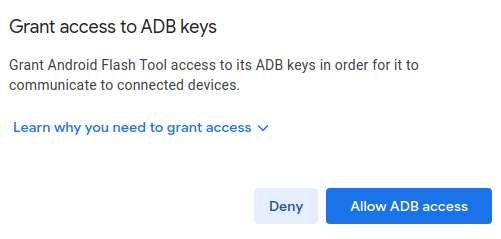
<li>A pop-up asking for ADB privileges will show up, just click on <strong>Allow ADB Access</strong></li>
</ul>
<img alt="/posts/images/flash_adb.png" src="/posts/images/flash_adb.png" />
<ul class="simple">
<li>plug the device on a USB port</li>
<li>Click on <strong>add a new device</strong></li>
<li>Select <strong>Pixel 2</strong> in the list</li>
<li>Type the image ID you want to apply (In my case: OPD1.170816.010)</li>
<li>choose some options (like <strong>lock the bootloader</strong>)</li>
<li>Click on <strong>Install build</strong></li>
</ul>
</div>
		
		<a href="https://www.bedis9.net/posts/2022_02_04_google_pixel_g2_stock_rom.html#disqus_thread">Comments</a>
		]]></content>
        </entry>
        <entry>
                <title>Chrome 58 and SAN certificates requirements</title>
                <link href="https://www.bedis9.net/posts/2017_06_09_chrome58_and_san_certificates_requirements.html" />
                <link rel="alternate" type="text/html" href="https://www.bedis9.net/posts/2017_06_09_chrome58_and_san_certificates_requirements.html" />
                <id>https://www.bedis9.net/posts/2017_06_09_chrome58_and_san_certificates_requirements.html</id>
                <updated>2017-06-09T00:00:00Z</updated>
		<published>2017-06-09T00:00:00Z</published>
		<summary>   How to generate self signed certificates compatible with Chrome 58 and
   above Chrome 58 now imposes that the Common Name of a certificate to be
   available in the list of the alternative names. This is because of
   RFC2818, which changes the way to match the commonName in certificates.
   More information here:
   https://www.chromestatus.com/feature/4981025180483584</summary>
		<author><name>Baptiste Assmann</name><email>bedis9@gmail.com</email></author>
                <content type="html"><![CDATA[<p><cite>Posted on 2017-06-09</cite></p>
<p>Chrome 58 now imposes that the Common Name of a certificate to be available in the list of the alternative names. This is because of RFC2818, which changes the way to match the commonName in certificates. More information here: <a class="reference external" href="https://www.chromestatus.com/feature/4981025180483584">https://www.chromestatus.com/feature/4981025180483584</a></p>
<p>At work, I own my own CA, so I can sign my own certificates and use them wherever I need to. My main purpose is to avoid those boring warning messages related to self signed certificates. Of course, I have to import my CA certificate into my browser (so it can trust me despite they are self signed).</p>
<p>I use the small bash script below to generate my certificates automatically and compatible with Chrome 58 requirements:</p>
<pre class="code bash literal-block">
<span class="name variable">NAME</span><span class="operator">=</span>vtmtmp.docker<span class="whitespace">

</span>cat<span class="whitespace"> </span><span class="literal string">&lt;&lt;EOF &gt;${NAME}.cnf
[req]
req_extensions = v3_req
distinguished_name = req_distinguished_name

[req_distinguished_name]
C = FR
ST = Ile de France
L = Paris
O = MySelf
OU = Systems Engineering
CN = ${NAME}

[v3_req]
basicConstraints = CA:FALSE
keyUsage = nonRepudiation, digitalSignature, keyEncipherment
subjectAltName = &#64;alt_names

[alt_names]
DNS.1 = ${NAME}
EOF</span><span class="whitespace">

</span>openssl<span class="whitespace"> </span>genrsa<span class="whitespace"> </span>-out<span class="whitespace"> </span><span class="literal string interpol">${</span><span class="name variable">NAME</span><span class="literal string interpol">}</span>.key<span class="whitespace"> </span><span class="literal number">2048</span><span class="whitespace">
</span>openssl<span class="whitespace"> </span>req<span class="whitespace"> </span>-new<span class="whitespace"> </span>-key<span class="whitespace"> </span><span class="literal string interpol">${</span><span class="name variable">NAME</span><span class="literal string interpol">}</span>.key<span class="whitespace"> </span>-out<span class="whitespace"> </span><span class="literal string interpol">${</span><span class="name variable">NAME</span><span class="literal string interpol">}</span>.csr<span class="whitespace"> </span>-nodes<span class="whitespace"> </span>-sha256<span class="whitespace"> </span>-subj<span class="whitespace"> </span><span class="literal string double">&quot;/CN=</span><span class="literal string interpol">${</span><span class="name variable">NAME</span><span class="literal string interpol">}</span><span class="literal string double">&quot;</span><span class="whitespace"> </span>-config<span class="whitespace"> </span><span class="literal string interpol">${</span><span class="name variable">NAME</span><span class="literal string interpol">}</span>.cnf<span class="whitespace">
</span>openssl<span class="whitespace"> </span>x509<span class="whitespace"> </span>-req<span class="whitespace"> </span>-in<span class="whitespace"> </span><span class="literal string interpol">${</span><span class="name variable">NAME</span><span class="literal string interpol">}</span>.csr<span class="whitespace"> </span>-CA<span class="whitespace"> </span>root.pem<span class="whitespace"> </span>-CAkey<span class="whitespace"> </span>ca.key<span class="whitespace"> </span>-CAcreateserial<span class="whitespace"> </span>-out<span class="whitespace"> </span><span class="literal string interpol">${</span><span class="name variable">NAME</span><span class="literal string interpol">}</span>.crt<span class="whitespace"> </span>-days<span class="whitespace"> </span><span class="literal number">3650</span><span class="whitespace"> </span>-extensions<span class="whitespace"> </span>v3_req<span class="whitespace"> </span>-extfile<span class="whitespace"> </span><span class="literal string interpol">${</span><span class="name variable">NAME</span><span class="literal string interpol">}</span>.cnf<span class="whitespace">
</span>cat<span class="whitespace"> </span><span class="literal string interpol">${</span><span class="name variable">NAME</span><span class="literal string interpol">}</span>.crt<span class="whitespace"> </span><span class="literal string interpol">${</span><span class="name variable">NAME</span><span class="literal string interpol">}</span>.key<span class="whitespace"> </span>&gt;<span class="whitespace"> </span><span class="literal string interpol">${</span><span class="name variable">NAME</span><span class="literal string interpol">}</span>.pem
</pre>
		
		<a href="https://www.bedis9.net/posts/2017_06_09_chrome58_and_san_certificates_requirements.html#disqus_thread">Comments</a>
		]]></content>
        </entry>
        <entry>
                <title>Letsencrypt for HAProxy</title>
                <link href="https://www.bedis9.net/posts/2016_12_28_letsencryptforhaproxy.html" />
                <link rel="alternate" type="text/html" href="https://www.bedis9.net/posts/2016_12_28_letsencryptforhaproxy.html" />
                <id>https://www.bedis9.net/posts/2016_12_28_letsencryptforhaproxy.html</id>
                <updated>2016-12-28T00:00:00Z</updated>
		<published>2016-12-28T00:00:00Z</published>
		<summary>   How I automate letsencrypt certificates and OCSP for HAProxy
   Let'sencrypt (https://letsencrypt.org) is a free, automated and open
   Certificate Authority. It uses the ACME protocol
   (https://github.com/letsencrypt/acme-spec) to issue / renew
   certificates. Certificates provided by letsencrypt are valid for 90
   days (3 months), which means we have to renew them very often! That
   said, this renewal can be fully automated thanks to the ACME protocol.</summary>
		<author><name>Baptiste Assmann</name><email>bedis9@gmail.com</email></author>
                <content type="html"><![CDATA[<p><cite>Posted on 2016-12-28</cite></p>
<p>Let'sencrypt (<a class="reference external" href="https://letsencrypt.org">https://letsencrypt.org</a>) is a free, automated and open Certificate Authority.
It uses the ACME protocol (<a class="reference external" href="https://github.com/letsencrypt/acme-spec">https://github.com/letsencrypt/acme-spec</a>) to issue / renew certificates.
Certificates provided by letsencrypt are valid for 90 days (3 months), which means we have to renew them very often! That said, this renewal can be fully automated thanks to the ACME protocol.</p>
<p>HAProxy is an open source Reverse-Proxy/Load-Balancer and I use it everywhere on my personnal websites.
It can process SSL/TLS and of course is compatible with letsencrypt certificates.
That said, it needs some help to get its certificates renewed and I wrote my own script to do the following:</p>
<ul class="simple">
<li>issue / renew certificate from letsencrypt</li>
<li>issue OCSP stamps from letsencrypt for my certificates and update them at run time into HAProxy</li>
</ul>
<p>For the ACME protocol layer, I use acme.sh (<a class="reference external" href="https://github.com/Neilpang/acme.sh">https://github.com/Neilpang/acme.sh</a>), a simple and minimalistic shell script, yet very efficient!</p>
<ul class="simple">
<li>acme.sh documentation: <a class="reference external" href="https://github.com/Neilpang/acme.sh/wiki">https://github.com/Neilpang/acme.sh/wiki</a></li>
</ul>
<p>My scripts for an easy integration of HAProxy and letsencrypt are available here:</p>
<ul class="simple">
<li><strong>gitlab</strong>: <a class="reference external" href="https://gitlab.com/bedis9/letsencryptforhaproxy/">https://gitlab.com/bedis9/letsencryptforhaproxy/</a> (public in the gitlab way: need a gitlab account)</li>
<li><strong>github</strong>: <a class="reference external" href="https://github.com/bedis/letsencryptforhaproxy">https://github.com/bedis/letsencryptforhaproxy</a> (for public/anonymous access)</li>
</ul>
		
		<a href="https://www.bedis9.net/posts/2016_12_28_letsencryptforhaproxy.html#disqus_thread">Comments</a>
		]]></content>
        </entry>
        <entry>
                <title>Welcome!!!!</title>
                <link href="https://www.bedis9.net/posts/2016_06_15_welcome.html" />
                <link rel="alternate" type="text/html" href="https://www.bedis9.net/posts/2016_06_15_welcome.html" />
                <id>https://www.bedis9.net/posts/2016_06_15_welcome.html</id>
                <updated>2016-06-15T00:00:00Z</updated>
		<published>2016-06-15T00:00:00Z</published>
		<summary>   Welcome message!!! Hey there!!!</summary>
		<author><name>Baptiste Assmann</name><email>bedis9@gmail.com</email></author>
                <content type="html"><![CDATA[<p><cite>Posted on 2016-06-15</cite></p>
<p>Hey there!!!</p>
<p>This is my first post on this blog/website. I'm happy everything seems to work smoothly!
Later, in those pages, I'll explain what my setup looks like and how I'm managing my website using docker, git a
nd bash.</p>
<p>Stay tuned!</p>
		
		<a href="https://www.bedis9.net/posts/2016_06_15_welcome.html#disqus_thread">Comments</a>
		]]></content>
        </entry>
</feed>