Brother DS-620 Scanner and Ubuntu 24.04: The Dependency Nightmare
Posted on 2026-04-07
If you recently upgraded to Ubuntu 24.04 and your Brother DS-620 scanner stopped working with XSane, you’re not alone. The issue isn’t hardware—it’s a dependency mess introduced by Ubuntu’s transition from libsane to libsane1. Here’s how I fixed it.
The Problem
After upgrading, scanimage -L returned:
No scanners were identified.
Yet, lsusb confirmed the scanner was connected:
Bus 003 Device 003: ID abcd:abcd Brother Industries, Ltd DS-620
The culprit? Brother's driver package, libsane-dsseries_1.0.5-1_amd64.deb, depends on libsane (>= 1.0.17). But in Ubuntu 24.04, libsane no longer exists —it's been replaced by libsane1.
When I tried to install the driver:
sudo dpkg -i libsane-dsseries_1.0.5-1_amd64.deb

dpkg: dependency problems prevent configuration of libsane-dsseries:
 libsane-dsseries depends on libsane (>= 1.0.17); however:
  Package libsane is not installed.
The Solution
After a few minutes of troubleshooting, the only fix that worked was forcing the installation despite the dependency issue:
sudo dpkg --force-depends -i libsane-dsseries_1.0.5-1_amd64.deb
This bypasses the dependency check, and—surprisingly—the scanner works perfectly. The libsane1 package in Ubuntu 24.04 is compatible enough for Brother's driver to function, even though the package names don't match.
Final Thoughts
This isn't the cleanest solution, but it's effective. If you're in the same boat, give it a try. Just remember: this is a temporary workaround until Brother or Ubuntu addresses the dependency issue properly.
Customize DHCP response from the Freebox Server
Posted on 2026-14-05
If you're managing a local lab or a home network with multiple services, you've likely run into the limitation of the Freebox DHCP interface. While it's a solid piece of hardware, the web UI doesn't always make it obvious how to pass complex configurations, specifically for Option 119 (Domain Search List).
Freebox server and custom DHCP options
From your LAN connection, browse the following URL to access your Freebox admin page: https://mafreebox.freebox.fr/. Click on the bottom left "f" image, then Connexion, then type your password.
Once connected: * double click on the "Paramètres de la Freebox" icon

double click on DHCP
scroll down to the bottom of the page
Click on "Ajouter une option"
- Select the option name
- Set the "valeur", which must be an hexadecimal string
I guess, Free does this to just have to send a bunch of bytes on the wire without processing them beforehand.
The Hexadecimal Puzzle
When you try to add multiple search domains (option name "Domain search" or ID 119) (e.g., int.bedis9.net and ui.bedis9.net), the Freebox Server expects a raw hexadecimal string rather than a comma-separated list. This is because it follows RFC 3397, which requires domains to be encoded as a series of labels, each prefixed by its length.
Note
Standard ASCII won't work here. You need to transform "example.com" into 076578616d706c6503636f6d00.
Translation with Bash
To save ourselves from manual hex conversion every time we update our infrastructure, I wrote a small utility script. It's bi-directional: give it a semicolon-separated list of domains to get the hex code, or paste a hex string to see what's hidden inside.
#!/bin/bash
# RFC 3397 Converter for Freebox DHCP Option 119

encode_rfc() {
    local input=$1
    local hex_result=""
    IFS=';' read -ra ADDR <<< "$input"
    for domain in "${ADDR[@]}"; do
        IFS='.' read -ra LABELS <<< "$domain"
        for label in "${LABELS[@]}"; do
            len=$(printf "%02x" ${#label})
            hex_label=$(echo -n "$label" | xxd -p)
            hex_result+="${len}${hex_label}"
        done
        hex_result+="00"
    done
    echo "$hex_result"
}

decode_rfc() {
    local hex=$1
    local i=0
    local result=""
    while [ $i -lt ${#hex} ]; do
        len_hex=${hex:$i:2}
        len=$((16#$len_hex))
        i=$((i + 2))
        if [ "$len" -eq 0 ]; then
            result+=";"
        else
            label_hex=${hex:$i:$((len * 2))}
            label=$(echo -n "$label_hex" | xxd -r -p)
            result+="$label"
            i=$((i + (len * 2)))
            next_len_hex=${hex:$i:2}
            if [ "$next_len_hex" != "00" ] && [ "$i" -lt ${#hex} ]; then
                result+="."
            fi
        fi
    done
    echo "${result%;}"
}

# Main logic
INPUT=$1
if [[ -z "$INPUT" ]]; then
    echo "Usage: $0 <string_or_hex>"
    exit 1
fi

if [[ "$INPUT" =~ ^[0-9a-fA-F]+$ ]]; then
    decode_rfc "$INPUT"
else
    encode_rfc "$INPUT"
fi
Example
Once set in the Freebox, the option should look like:

RockPi S (un)freezing
Posted on 2026-20-04
The Rock Pi S is a powerhouse in a tiny form factor, but it is notoriously sensitive. If you are experiencing hard freezes where SSH drops and the serial console goes silent, you aren't alone.
This guide documents the journey from a "frozen" board to a rock-solid running system.
The Symptoms of a "frozen" Board
Random freezes on the Rock Pi S often don't leave a "smoking gun" in the logs. When the system hangs, it typically manifests as:
- D-Bus Gridlock: Commands like systemctl status or reboot time out.
- Kernel Wait: The command df -h hangs indefinitely.
- Protocol Errors: Systemd fails to fork new processes with a "Protocol error" message.
If your CPU and RAM aren't spiking, the issue is almost certainly a filesystem I/O hang or voltage instability.
The Silent Killer: Hard NFS Mounts
The most frequent cause of system-wide lockups on small boards is a "hard" NFS mount. By default, many Linux systems use hard mounts, which tell the kernel to wait forever if the NAS goes offline.
On a Rock Pi S, this creates a "suicide pact" between the board and the network. If a single packet is lost, the kernel enters an uninterruptible sleep, blocking D-Bus and eventually freezing the entire OS.
The Fix: Update your /etc/fstab to use "soft" mounts with aggressive timeouts:
NFS:/volume1/share /mnt/tmp nfs rw,soft,intr,timeo=50,retrans=3,noatime 0 0
Taming the RK3308: The Stability Ladder
The Rockchip RK3308 is sensitive to voltage ripples. Rapid frequency switching (the ondemand governor) can cause micro-sags in power that crash the MMC controller.
To ensure 100% uptime for critical services like HAProxy, we use a "Stability Ladder" approach.
Underclocking for Reliability
Set the CPU to a fixed, lower frequency. This eliminates voltage spikes and keeps the board cool.
# Set to 408 MHz permanently in /etc/default/cpufrequtils
MIN_SPEED=408000
MAX_SPEED=408000
GOVERNOR=performance
While 408 MHz sounds slow, HAProxy is an I/O-driven beast. It handles SSL termination and reverse proxying remarkably well at this speed, as long as the network throughput remains within the Fast Ethernet limits.
Also note that I'm still in "recovery phase" on this device and I'll increase CPU speed to 600 then 816MHz.
Optimizing HAProxy for Low-Power Boards
If you are terminating SSL at 408 MHz, efficiency is your only friend.
- Use ECDSA Certificates: Elliptic Curve math is significantly lighter on the ARMv8 architecture than traditional RSA.
- Enable Session Resumption: Avoid full handshakes by allowing clients to resume TLS sessions.
- Local Logging: Never log HAProxy activity directly to an NFS share. Use a local RAM log to prevent I/O wait-states.
Summary Checklist
- Power: Use a high-quality 5V/2A supply and a short USB-C cable.
- NFS: Switch all network mounts to soft,intr.
- CPU: Lock the governor to performance at a stable frequency.
By moving from a "reactive" frequency scaling to a "static" stable state, the Rock Pi S transforms from a hobbyist toy into a reliable piece of infrastructure.
Add HAProxy in front of Home Assistant
Posted on 2024-17-02
HAProxy is a widely used HTTP reverse proxy and I use it at home to give access to various internal services I need. At home, I also use home assistant to manage my heaters and my aquarium. Both solutions are open source and I guess many people will use them together at some point.
Because HAProxy operates as a reverse proxy, it uses (by default) an IP address from the local machine to get connected to the server (home assistant in our case). When doing so, home assistant will see all clients coming from the same IP address. The problem is that Home assistant can be configured to block IPs which are failed too many login attempts.
Warning
This means that if HAProxy IP address got banned, then nobody will be able to use Home assistant anymore!
In order to avoid this situation, we want to properly configure HAProxy and home assistant together.
First, let's update HAProxy's configuration to send a X-Forwarded-For HTTP header which contains the end user client IP address:
backend b_homeassistant
  [...]
  http-request set-header x-forwarded-for %[src]
  [...]
Now, on home assistant side, just configure it to tell it there is an HAProxy in front of it and it must trust the X-Forwarded-For header sent by it:
http:
  use_x_forwarded_for: true
  trusted_proxies:
    - 192.168.A.B    # Reverse proxy / HAProxy IP address
When somebody fails on login, you'll see a notification like this:
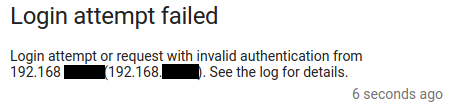
This shouldn't be the HAProxy address, but the address of the mobile phone / laptop who performed this attempt!
Get HAProxy core files on Debian 12
Posted on 2024-17-02
HAProxy is usually very reliable, that said my use case is not very common: I am using cutting edge version of the software on an aarch64 system and I may use code path that very few people uses, and so I may meet some bugs.
Note
HAProxy is Open Source and what I love the most about open source is that you can help the community making the product even better. Contributions are not only code, they may be a nice bug report that dev can leverage to quickly find the issue and make the software more reliable. This applies to any open source solution you use!
So today, we'll see how we can help the community when an unexpected event happens :)
Note
Keep in mind these instructions apply to Debian 12. They might be different for your own environment.
First, we need to raise the size for the core files. For this purpose, we create a new file in /etc/security/limits.d/core.conf:
* soft core unlimited
Then, we need to tell our kernel where to save coredump files. For this, we'll add a new file in /etc/sysctl.d/98-core.conf with the following content:
kernel.core_pattern=/tmp/core-%e-%p
Because our HAProxy is chrooted, we need to ensure that a /tmp folder exists in there:
sudo mkdir YOUR_HAPROXY_CHROOT_PATH/tmp
sudo chmod a+w YOUR_HAPROXY_CHROOT_PATH/tmp
Last, we can also enable the set-dumpable parameter in HAProxy's global configuration.
global
 [...]
 set-dumpable
According to the doc, this parameter will perform the following:
will try hard to re-enable core dumps that were possibly disabled by file size limitations (ulimit -f), core size limitations (ulimit -c), or "dumpability" of a process after changing its UID/GID (such
It's basically a very nice helper, but does not prevent you from checking a core dump is well produced at the expected place: sudo kill -11 $(pgrep haproxy) will produce a core.
A quick troubleshooting / checklist if you can't get your core files: - ensure ulimit -f and ulimit -c are set properly for the user HAProxy drops privileges to - ensure the target core dump directory exists in the chroot - ensure the user running the HAProxy process can write into this directory - always try to generate a core to double check everything works as expected
For more information and use cases on this topic, you can read this excellent page
For the record, the "bug" I am tracking currently is not in HAProxy, but somewhere between OpenSSL and the libc on my aarch64 debian. Here is my backtrace from gdb:
#0  0x0000ffffa12ef690 in free () from /lib/aarch64-linux-gnu/libc.so.6
#1  0x0000aaaad8509cec in ossl_ecx_key_free ()
#2  0x0000aaaad8468f18 in ecx_freectx ()
#3  0x0000aaaad83b22c4 in evp_pkey_ctx_free_old_ops ()
#4  0x0000aaaad83b2330 in EVP_PKEY_CTX_free ()
#5  0x0000aaaad82a60dc in ssl_derive ()
#6  0x0000aaaad82edfe0 in tls_construct_stoc_key_share ()
#7  0x0000aaaad82e410c in tls_construct_extensions ()
#8  0x0000aaaad82feea4 in tls_construct_server_hello ()
#9  0x0000aaaad82ef888 in state_machine ()
#10 0x0000aaaad82b616c in SSL_do_handshake ()
#11 0x0000aaaad7f01670 in ssl_sock_handshake (conn=0xaaaadb76cb70, flag=134217728) at src/ssl_sock.c:6283
#12 0x0000aaaad7f02398 in ssl_sock_io_cb (t=0xffff8c02b7d0, context=0xffff8c02ba10, state=32960)
    at src/ssl_sock.c:6626
#13 0x0000aaaad81ce300 in run_tasks_from_lists (budgets=0xffff9b7ec6d8) at src/task.c:596
#14 0x0000aaaad81cf090 in process_runnable_tasks () at src/task.c:876
#15 0x0000aaaad816e73c in run_poll_loop () at src/haproxy.c:3050
#16 0x0000aaaad816f0b4 in run_thread_poll_loop (data=0xaaaad8af3cc0 <ha_thread_info+192>) at src/haproxy.c:3252